
How MSPs Add a Mobile Security Layer in 2026

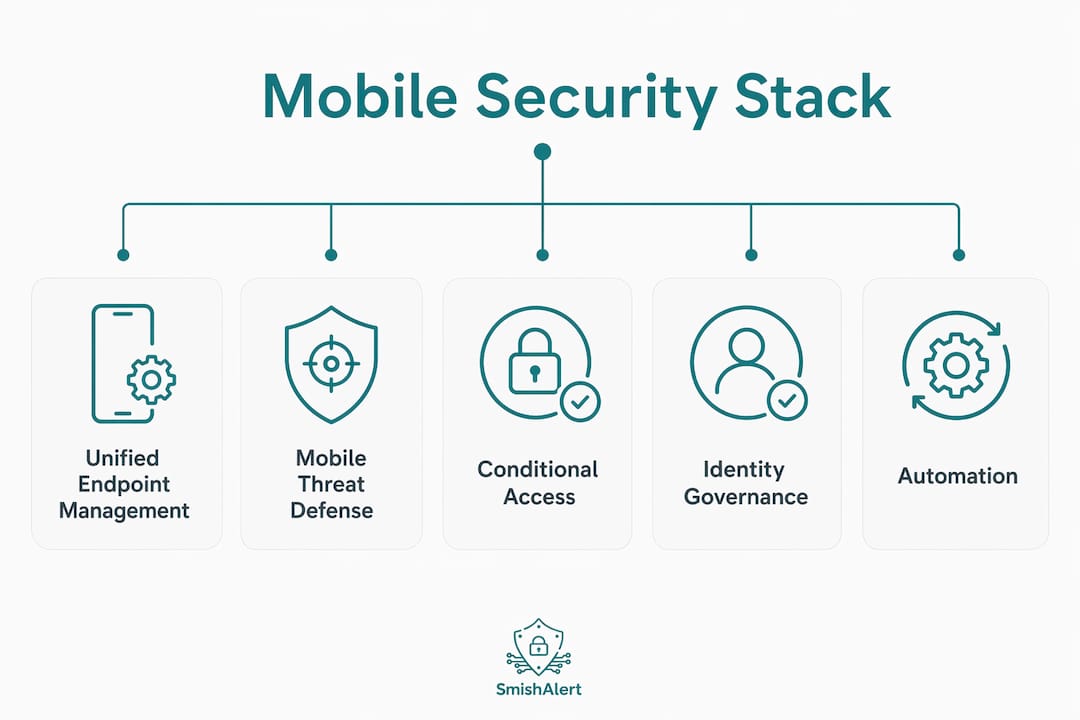
MSPs add a mobile security layer by deploying an integrated stack of Unified Endpoint Management (UEM), Mobile Threat Defense (MTD), and conditional access policies that enforce real-time protections across every managed device. This approach, recognized in the industry as a mobile security stack, goes far beyond simple device enrollment. Platforms like Microsoft Intune, Jamf, and Apple Business Manager give MSPs the control plane to automate policy enforcement, isolate corporate data, and map security controls directly to compliance frameworks like SOC 2 and HIPAA. Understanding how MSPs add a mobile security layer is now a prerequisite for any IT decision-maker evaluating managed security services.
What is the mobile security stack for msps?
The mobile security stack for MSPs is defined as a multi-layered architecture combining Mobile Device Management (MDM), Mobile Application Management (MAM), Mobile Threat Defense (MTD), and identity access controls into a single, manageable service offering. Each layer addresses a distinct attack surface. MDM handles device-level policy enforcement. MAM governs application behavior and data containment. MTD detects active threats in real time. Identity and access controls determine who gets in and under what conditions.
The core components of a well-structured MSP mobile security stack include:
- UEM platform: Microsoft Intune or Jamf serves as the central management console, combining MDM and MAM functions under one roof.
- Mobile Threat Defense: Solutions that monitor for phishing attempts, malicious applications, network anomalies, and OS-level vulnerabilities.
- Conditional Access: Policies that evaluate device compliance, app protection status, and user risk before granting access to corporate resources.
- PSA/RMM integration: Multi-tenant consoles that push automated alerts into service tickets, reducing manual triage and improving client management efficiency.
| Stack Layer | Primary Function | Example Tools |
|---|---|---|
| UEM/MDM | Device enrollment, policy enforcement | Microsoft Intune, Jamf |
| MAM | App-level data isolation | Intune App Protection Policies |
| MTD | Real-time threat detection | Lookout, Zimperium, Microsoft Defender |
| Conditional Access | Risk-based access enforcement | Microsoft Entra ID, Okta |
| PSA/RMM Integration | Ticket automation, multi-tenant ops | ConnectWise, NinjaRMM |
Pro Tip: When evaluating MSP mobile security platforms, prioritize native multi-tenancy. Managing 50 clients through a single pane of glass is operationally non-negotiable at scale.
Fragmented point solutions increase technician workload and raise the risk of missed alerts. Platform consolidation is not a convenience. It is a risk management decision.
How do msps use automation and zero-touch enrollment?
Automated enrollment is the operational foundation of how MSPs enhance mobile security at scale. Without it, onboarding becomes a bottleneck that consumes technician hours and introduces inconsistency. With Apple Business Manager and Android Zero-Touch, a device can be enrolled, configured, and policy-compliant before the end user ever touches it.
The standard MSP mobile device onboarding workflow follows this sequence:
- Device purchase and registration: The device is registered in Apple Business Manager or Android Zero-Touch at the point of procurement, tying it to the organization’s MDM server automatically.
- MDM profile push: On first power-on, the device receives its configuration profile, including Wi-Fi settings, VPN configuration, and certificate enrollment, without technician intervention.
- App Protection Policy deployment: Intune App Protection Policies are applied at the application layer, creating a logical container for corporate data that prevents copy-paste, screenshot, and data transfer to unmanaged apps.
- Conditional Access verification: Before the user accesses Microsoft 365, Azure, or any corporate SaaS application, the device must pass a compliance check against the defined policy baseline.
- Ticket closure: PSA integration logs the enrollment event and closes the onboarding ticket automatically.
A secure mobile onboarding process takes 5–10 minutes per user with automated enrollment tools. That speed is significant. It means an MSP can onboard a 200-person organization’s mobile fleet in a single business day without dedicating a technician to each device.
Pro Tip: Deploy Intune App Protection Policies on BYOD devices without full MDM enrollment. This gives you corporate data control without requiring employees to surrender device management to their employer.
UEM platforms like Microsoft Intune and Jamf reduce support overhead by approximately 40% through automated policy enforcement and centralized patching. That reduction translates directly into margin improvement for the MSP and faster resolution times for the client.

Why integrating MTD with MDM is essential for msps
Mobile Threat Defense is the detection engine that transforms a static MDM deployment into a living, responsive security layer. MDM alone tells you the device is enrolled and compliant at the moment of check-in. MTD tells you what is happening to that device right now.
The threats MTD addresses that MDM cannot include:
- Phishing via SMS, WhatsApp, and iMessage: MTD solutions analyze link reputation and message content in real time, blocking credential-harvesting attempts before the user clicks.
- Malicious or risky applications: MTD scans installed apps for known malware signatures, excessive permissions, and behavioral anomalies that indicate data exfiltration risk.
- Network-based attacks: Man-in-the-middle attacks on public Wi-Fi, rogue access points, and SSL stripping are detected at the network layer.
- OS vulnerabilities and jailbreaking: Devices running outdated OS versions or modified firmware are flagged immediately, triggering automated remediation.
“The synergy between Mobile Threat Defense and Mobile Device Management via automated API interactions enables real-time threat mitigation, revoking device access promptly when risk indicators like jailbreaking or malicious networks are detected.” — Mobile Endpoint Security and Governance
MSPs must integrate MTD with IAM and conditional access to block access in real time upon detecting suspicious activity. The API connection between the MTD solution and Microsoft Entra Conditional Access is what makes this automatic. When Lookout or Zimperium flags a device as high-risk, Entra revokes its access token within seconds. No technician approval required. No alert sitting in a queue.
Modern mobile security requires multi-layered defense including enrollment, threat detection, and identity governance to mitigate emerging mobile-specific threats. MSPs that rely on enrollment alone are operating with a significant blind spot. The attack chain on mobile devices increasingly starts with a smishing message, not a malware download. Visibility into that human layer is what separates a reactive MSP from a proactive one. For more on why this gap persists, see why mobile endpoints are harder to protect in 2026.
How do msps balance mobile security with user privacy?
BYOD environments create a genuine tension between security enforcement and employee privacy. MSPs that ignore this tension face two problems: employee resistance that undermines adoption, and audit failures that expose clients to regulatory liability.
The resolution lies in enrollment model selection:
- Work profile enrollment (Android): Creates a hardware-enforced separation between personal and corporate data. The MDM has zero visibility into the personal profile. Corporate data can be wiped without touching personal photos, messages, or applications.
- MAM-only enrollment: Applies Intune App Protection Policies to specific managed applications without enrolling the device at all. This is the least invasive option and is appropriate for organizations with strong employee privacy requirements.
- User Enrollment (Apple): Apple’s privacy-preserving enrollment model for iOS gives the MDM control over a managed Apple ID partition while leaving personal data completely inaccessible to the administrator.
MSPs avoid full device control in BYOD environments by deploying work profile or MAM-only enrollment, ensuring corporate data can be wiped without infringing on personal privacy. This approach resolves employee resistance and prevents the compliance pitfalls that come from overreaching device policies.
Conditional Access policies based on device compliance, app protection, and user risk automate enforcement beyond simple MFA. This matters in BYOD contexts because it removes the burden of trust decisions from individual users and places it in the policy engine.
Pro Tip: Document your BYOD enrollment model in writing before deployment. Clients who cannot explain their BYOD policy to an auditor will fail the audit, regardless of how well the technology is configured.
MSPs that frame mobile security as a compliance-ready service for SOC 2 and HIPAA audits create a defensible position for clients and a stronger sales narrative for themselves.
What business benefits do msps gain from mobile security layers?
Bundling mobile security into a managed service offering is a financial decision as much as a technical one. The profitability gap between reactive support models and bundled managed security is substantial.
| Business Metric | Reactive Support Model | Bundled Managed Security |
|---|---|---|
| Profitability | Baseline | Up to 70% higher |
| Partner retention | Variable | Approximately 95% |
| Pricing justification | Device management only | Compliance and audit readiness |
| Tool sprawl | High | Reduced through platform consolidation |
MSPs selling mobile security as a compliance product for SOC 2 and HIPAA justify higher price points than bare device management services. The compliance framing shifts the conversation from cost to risk reduction. Clients pay for device management reluctantly. They pay for audit readiness willingly.
Bundled managed security services yield up to 70% higher profitability compared to reactive support models. That figure reflects the compounding effect of recurring revenue, reduced per-incident labor costs, and the premium pricing that compliance-ready services command. MSPs working with virtual CISO partners can further strengthen their compliance narrative by aligning mobile security controls to client-specific regulatory frameworks.
Key takeaways
MSPs that integrate UEM, MTD, and conditional access into a unified mobile security stack consistently outperform those relying on enrollment-only models in both security outcomes and business profitability.
| Point | Details |
|---|---|
| Stack integration is non-negotiable | UEM, MTD, and conditional access must work together to deliver real-time enforcement. |
| Automation drives margin | Zero-touch enrollment and policy automation reduce support overhead by approximately 40%. |
| MTD closes the MDM blind spot | MTD detects active threats like phishing and jailbreaking that MDM cannot see. |
| BYOD requires enrollment model discipline | Work profile and MAM-only enrollment protect privacy and prevent audit failures. |
| Compliance framing increases revenue | Positioning mobile security as a compliance product justifies premium pricing and improves retention. |
Where MSP mobile security strategy is actually heading
The MSPs I see winning in 2026 are not the ones with the most tools. They are the ones who have collapsed their stack into a coherent platform and can explain every control in business terms during a client QBR.
The shift from point solutions to integrated platforms is not just an operational preference. It is a survival requirement. Technicians managing five separate consoles for MDM, MTD, IAM, PSA, and reporting are one missed alert away from a breach that ends a client relationship. The MSPs consolidating onto Microsoft Intune plus Defender for Endpoint plus Entra Conditional Access have a single telemetry stream, a single policy engine, and a single audit trail. That is a fundamentally different security posture.
The area where I see the most consistent failure is BYOD privacy documentation. The technology is usually configured correctly. The policy document either does not exist or was written three years ago and never updated. Auditors are not impressed by a well-configured Intune tenant if the BYOD policy cannot explain what data is collected, how long it is retained, and what happens when an employee leaves. Fix the documentation first.
The other gap that rarely gets addressed is messaging-based social engineering. MTD and MDM protect the device. They do not protect the human. An employee who receives a credential-harvesting SMS from an executive impersonator and complies has bypassed every technical control in the stack. That is the attack surface most MSP mobile security strategies leave completely unaddressed.
— Sophie
How Smishalert extends your MSP mobile security stack

Smishalert addresses the threat vector that UEM and MTD platforms cannot see: social engineering attacks delivered through SMS, iMessage, and WhatsApp. For MSPs building a complete mobile security layer, Smishalert adds visibility into executive impersonation, credential-harvesting campaigns, and payroll fraud attempts that target employees directly through messaging channels. The platform provides audit-grade reporting that maps directly to compliance requirements, giving MSPs a defensible record of threat detection and response. Explore Smishalert’s full mobile threat detection solutions to see how it integrates with existing MSP security stacks and closes the human layer gap that technical controls alone cannot address.
FAQ
What is the core mobile security stack for msps?
The core mobile security stack for MSPs combines UEM (MDM and MAM), Mobile Threat Defense, and conditional access policies into a unified architecture. Platforms like Microsoft Intune and Jamf serve as the management foundation, with MTD solutions providing real-time threat detection.
How long does mobile device onboarding take with automation?
Automated enrollment using Apple Business Manager or Android Zero-Touch reduces onboarding to 5–10 minutes per user. This allows MSPs to deploy compliant devices at scale without dedicating technician time to each individual device.
Why is MTD necessary if MDM is already deployed?
MDM enforces policy at enrollment time but cannot detect active threats like phishing links, malicious apps, or jailbreaking in real time. MTD fills this gap by providing continuous monitoring and triggering automated conditional access enforcement when risk is detected.
How do msps handle BYOD without violating employee privacy?
MSPs use work profile enrollment on Android, User Enrollment on iOS, or MAM-only policies to separate corporate and personal data. This allows corporate data to be wiped remotely without the MDM ever accessing personal content.
How does mobile security improve MSP profitability?
Bundling mobile security as a compliance-ready managed service yields up to 70% higher profitability compared to reactive support models. Framing the offering around SOC 2 and HIPAA readiness justifies premium pricing and drives partner retention rates toward 95%.